
Skip to content
View in the app

A better way to browse. Learn more.

Loyverse Town

A full-screen app on your home screen with push notifications, badges and more.

To install this app on iOS and iPadOS
  1. Tap the Share icon in Safari
  2. Scroll the menu and tap Add to Home Screen.
  3. Tap Add in the top-right corner.
To install this app on Android
  1. Tap the 3-dot menu (⋮) in the top-right corner of the browser.
  2. Tap Add to Home screen or Install app.
  3. Confirm by tapping Install.

New features for new POS app for iOS: Shift Report and Stock and Cost of Items

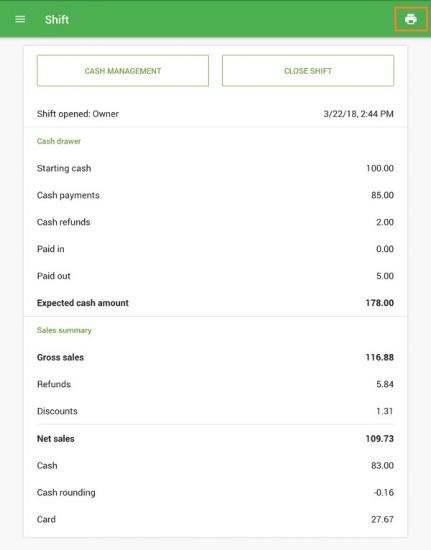
Sales summary in shift report

The closed shift report now contains data of the cash drawer and other sales summary report data. You can also print shift report with your receipt printer. 
shift_report_loyverse.jpg.365b24eb7689ea2766cff35ef17d2868.jpg

Reference: Shift Report with Sales Summary at the POS


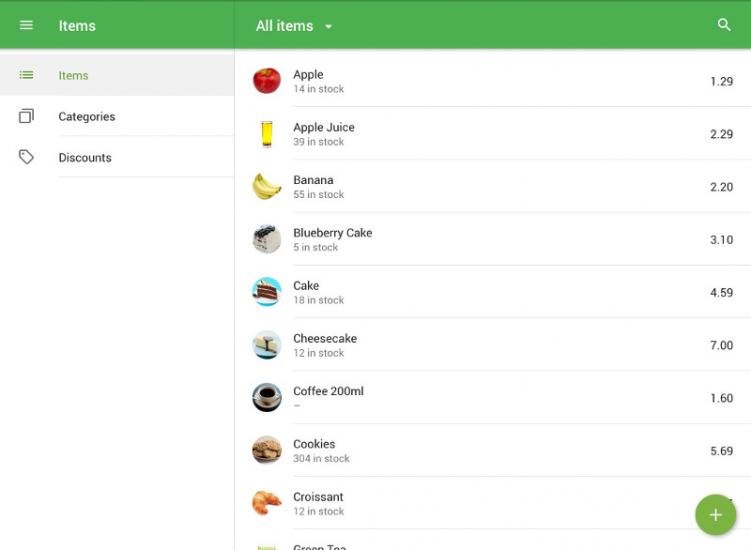
Displaying of the Stock and Cost of Items in the POS

Now you can see the current stock of your items in the store from the POS app.
stock-view-02.jpg.0324e2739dd39bc71a9fb3dbf79732fc.jpg

Reference: Displaying of the Stock and Cost of Items in the POS

0 Comments

Recommended Comments

There are no comments to display.

Account

Navigation

Search

Search

Configure browser push notifications

Chrome (Android)
  1. Tap the lock icon next to the address bar.
  2. Tap Permissions → Notifications.
  3. Adjust your preference.
Chrome (Desktop)
  1. Click the padlock icon in the address bar.
  2. Select Site settings.
  3. Find Notifications and adjust your preference.